int total(int price, int qty) {
  return price * qty;
}
JavaScript
function total(price, qty) {
  return price * qty;
}
Same braces, loops and if. No types to declare, and no malloc.
It can change the page while people are using it.
It can talk to a server without reloading the page.
And there's no gcc step. So how does it run?
Two ways code gets to run
Compiled ahead of time
shop.c
Compiler
shop.exe
CPU runs it
You ship a binary, built for each operating system and CPU.
Run by a runtime
shop.js
Browser or Node.js
Runs right away
You ship the source. Anything with the runtime can run it.
The line is blurry: V8, the engine in Chrome and Node.js, compiles JavaScript while it runs. TypeScript and Next.js add a build step before that. C# and Java sit in between, compiling to bytecode that a runtime then runs.
BEGIN and COMMIT make it all or nothing: you never get an order with no items.
Asking questions: SQL 101 starts here
SELECT p.name, oi.quantity, oi.unit_price
FROM order_items oi
JOIN products p ON p.product_id = oi.product_id
WHERE oi.order_id = 194;
name
quantity
unit_price
Mechanical Keyboard
1
89.00
Never paste user input into SQL text. That's why the API route uses $1: it blocks SQL injection.
MySQL and SQLite speak SQL too. MongoDB and Redis work differently, for different jobs.
The past: one program did everything
<h1>Your orders</h1>
<?php
$rows = $db->query("SELECT * FROM orders");

foreach ($rows as $row) {
  echo "<p>Order #{$row['order_id']}</p>";
}
?>
PHP mixed HTML, logic and SQL in one file.
C# with Microsoft SQL Server followed the same pattern on Windows.
The server built each finished page, and most clicks reloaded it.
A phone app couldn't reuse any of it: the output was pages, not data.
Plenty of this still runs today, so you may well meet it. It's simple, and it worked.
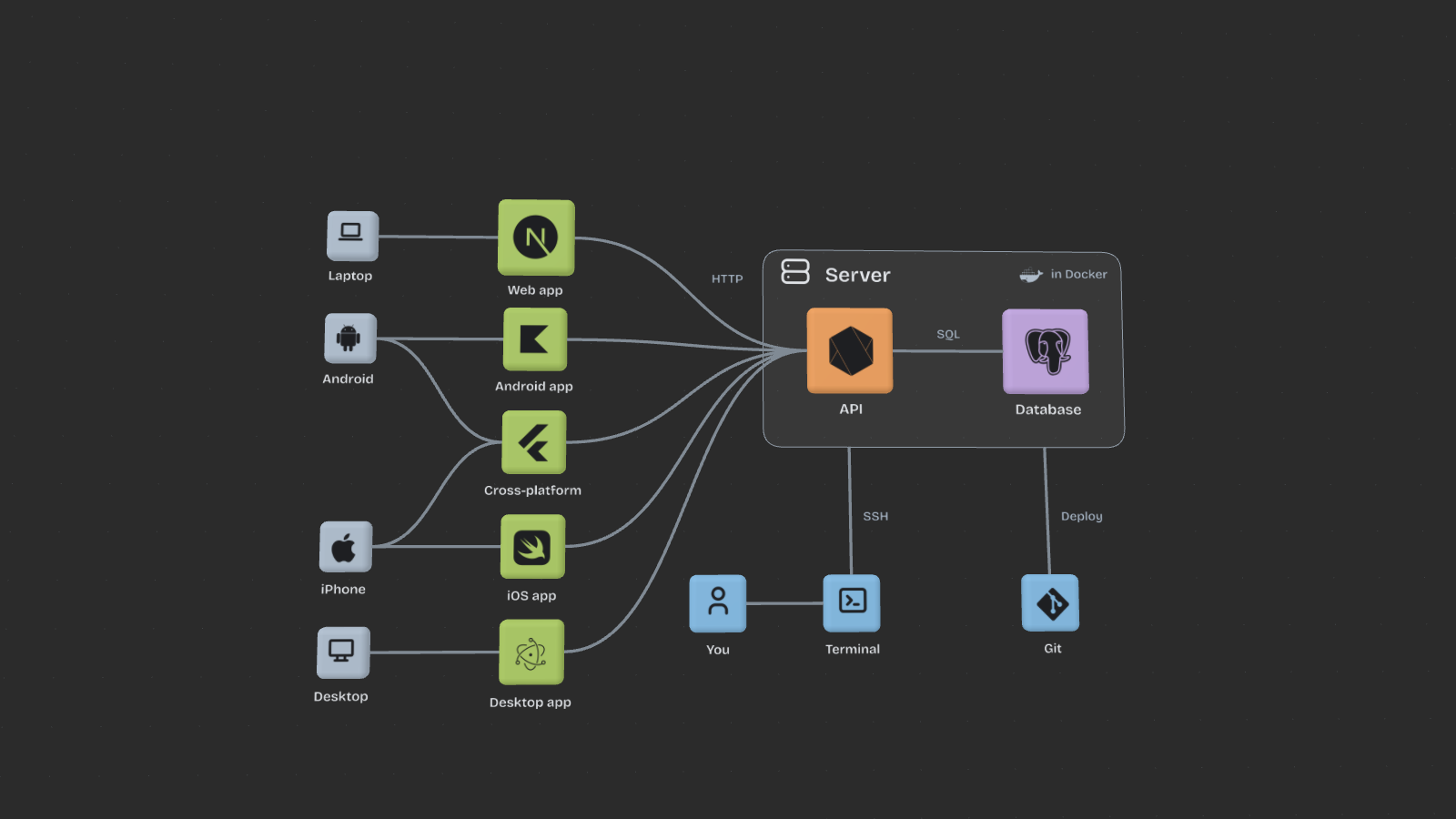
Now: separate parts that agree on HTTP
Web, mobile and desktop share one API, and each part can change and ship on its own.
One order, start to finish
React, in your browserfetch("/api/orders")
HTTP, over the internetPOST /api/orders
Node.js, on the serverapp.post("/api/orders", …)
SQL, in PostgresINSERT INTO orders …
JSON, then React again201 {"orderId":194}
Mobile: one app per OS, or one for both
Android
KotlinJava in older apps
Android StudioShips on Google Play
In between: one codebase
FlutterDart. Draws its own UI.
React NativeReact and JavaScript, with native UI.
CapacitorYour web app inside a native shell.
And others.NET MAUI, Kotlin Multiplatform
iOS
SwiftObjective-C in older apps
XcodeNeeds a Mac. Ships on the App Store.
Whichever you pick, the app still calls the same API.
Desktop: the same choice
Windows
C# and .NETC++ in older apps
Visual StudioShips as an installer or on the Microsoft Store
In between: one codebase
ElectronA web app bundled with its own browser. VS Code and Slack use it.
TauriA web UI using the OS's web view, with Rust behind it.
And othersFlutter, Qt
macOS
SwiftObjective-C in older apps
XcodeShips as a download or on the Mac App Store
Your web skills reach further than the browser.
The app is built. Where does it run?
Start on your own PCFree, and great for learning. But when it's off or your home internet drops, the shop is gone.Move to a data centerBuildings full of servers that stay on, with backup power, cooling and very fast networks.
Photos: Zarak Khan and Taylor Vick, on Unsplash
In practice, we rent a VM
One physical server, shared
Your VMSomeone else'sSomeone else's
VPS
A VM for a simple monthly price
Cloud
VMs plus many other services, billed by use
Security: they protect the building, the hardware and much of the network. Securing your VM is still your job.
Infrastructure: power, cooling and broken disks are their problem.
Speed: gigabit internet or faster, and a public IP address.
Room to grow: need more? Resize it or add another in minutes.
What you actually get: a command line
$ ssh root@203.0.113.10
Welcome to Ubuntu 24.04 LTS
root@vm:~#
You rent a VM and get an IP address and a login.
No desktop, no windows, no mouse. Just a prompt.
Installing, running and fixing your app all happen by typing.
So before anything else, you need the terminal.
The terminal: type instead of click
$ pwd
/home/intern/shop
$ ls
api docker-compose.yml web
$ cd api
$ grep -rn "api/orders" src
src/routes.js:12:app.post("/api/orders", …
$ npm start
API listening on port 3000
Most servers have no desktop to click on.
Commands can go in a script, so a job you did once can run forever.
Git, Docker, npm and SSH are all used from here.
SSH: a terminal on another computer
$ ssh intern@server.example.com
Welcome to Ubuntu
intern@server:~$ hostname
server
Everything you type is encrypted on the way.
You log in with a key pair. The public key goes on the server.
The private key stays on your laptop. Never send it to anyone.
A server is just a computer
Your programs, running as processes
nginxNode.jsPostgres
Linux kernel
Shares the hardware between processes
Hardware
CPUMemoryDiskNetwork
Bare metal means Linux installed directly on a physical machine.
A cloud VM is a slice of a shared machine. Over SSH it feels the same.
Ubuntu and Debian are distributions: the kernel plus tools and an installer.
Basic Linux: look around
server$ nproc
16
server$ grep MemTotal /proc/meminfo
MemTotal: 65536000 kB
server$ df -h /
Filesystem Size Used Avail Use% Mounted on
/dev/sda1 916G 120G 750G 14% /
server$ ps -C node,postgres -o pid,user,comm
PID USER COMMAND
982 postgres postgres
1204 shop node
/home is your files, /etc is settings, /var/log is logs.
Every file and process has an owner. sudo runs one command as root, the user who can do anything.
There's no recycle bin. After rm, the file is gone.
Deploying by hand
server$ sudo apt install nodejs postgresql nginx
server$ node --version
v18.19.1
server$ git clone git@git.example:shop.git
server$ cd shop && npm ci --omit=dev
server$ sudo systemctl enable --now shop-api
# Next release
server$ git pull && npm ci --omit=dev
server$ sudo systemctl restart shop-api
apt installs software, in whatever version this Linux release ships.
systemd starts your app at boot and can restart it after a crash.
To deploy is to put new code on the server and restart it. The rest is detail.
nginx: the front door
Browser
nginx :443
Node.js :3000
Postgres
server {
    listen 443 ssl;
    server_name shop.example.com;
    # certificate paths go here

    root /var/www/shop;

    location /api/ {
        proxy_pass http://127.0.0.1:3000;
    }
}
It handles HTTPS, so Node.js doesn't have to.
It serves the website's files itself and passes /api/ to Node.js.
Node.js listens only on 127.0.0.1, so the internet can't reach it directly.
sudo nginx -t checks the settings before you reload.
All of this was set up by hand. Do it again on a second server, and the two slowly stop matching.
"It works on my machine"
Your laptop
The server
OS
Windows
Linux
Node.js
22
18
Postgres
16
14
Same code, different result, and hours lost finding out why.
A container packs the app with the runtime it needs, so it runs the same everywhere.
From recipe to running app
You know this
shop.c
shop.exe
A running process
Docker
Dockerfile
Image
A running container
FROM node:22-slim
WORKDIR /app
COPY package*.json ./
RUN npm ci --omit=dev
COPY . .
CMD ["node", "server.js"]
docker build makes the image. docker run starts a container from it.





 nginx
Node.js
Postgres